您现在的位置是:网站首页> 编程资料编程资料
.net core webapi通过中间件获取请求和响应内容的方法_实用技巧_
 2023-05-24
280人已围观
2023-05-24
280人已围观
简介 .net core webapi通过中间件获取请求和响应内容的方法_实用技巧_
本文主要根据中间件来实现对.net core webapi中产生的请求和响应数据进行获取并存入日志文件中;
这里不详细介绍日志文件的使用。你可以自己接入NLog,log4net,Exceptionless等
创建接口记录的中间件
using Microliu.Core.Loggers; using Microsoft.AspNetCore.Builder; using Microsoft.AspNetCore.Http; using Microsoft.AspNetCore.Http.Internal; using Newtonsoft.Json; using System; using System.Collections.Generic; using System.Diagnostics; using System.IO; using System.Linq; using System.Text; using System.Threading.Tasks; namespace Ptibro.Partner.API.Extensions { public class RequestResponseLoggingMiddleware { private readonly RequestDelegate _next; private readonly ILogger _logger; private SortedDictionary _data; private Stopwatch _stopwatch; public RequestResponseLoggingMiddleware(RequestDelegate next, ILogger logger) { _next = next; _logger = logger; _stopwatch = new Stopwatch(); } public async Task Invoke(HttpContext context) { _stopwatch.Restart(); _data = new SortedDictionary(); HttpRequest request = context.Request; _data.Add("request.url", request.Path.ToString()); _data.Add("request.headers", request.Headers.ToDictionary(x => x.Key, v => string.Join(";", v.Value.ToList()))); _data.Add("request.method", request.Method); _data.Add("request.executeStartTime", DateTimeOffset.Now.ToString("yyyy-MM-dd HH:mm:ss.fff")); // 获取请求body内容 if (request.Method.ToLower().Equals("post")) { // 启用倒带功能,就可以让 Request.Body 可以再次读取 request.EnableRewind(); Stream stream = request.Body; byte[] buffer = new byte[request.ContentLength.Value]; stream.Read(buffer, 0, buffer.Length); _data.Add("request.body", Encoding.UTF8.GetString(buffer)); request.Body.Position = 0; } else if (request.Method.ToLower().Equals("get")) { _data.Add("request.body", request.QueryString.Value); } // 获取Response.Body内容 var originalBodyStream = context.Response.Body; using (var responseBody = new MemoryStream()) { context.Response.Body = responseBody; await _next(context); _data.Add("response.body", await GetResponse(context.Response)); _data.Add("response.executeEndTime", DateTimeOffset.Now.ToString("yyyy-MM-dd HH:mm:ss.fff")); await responseBody.CopyToAsync(originalBodyStream); } // 响应完成记录时间和存入日志 context.Response.OnCompleted(() => { _stopwatch.Stop(); _data.Add("elaspedTime", _stopwatch.ElapsedMilliseconds + "ms"); var json = JsonConvert.SerializeObject(_data); _logger.Debug(json, "api", request.Method.ToUpper()); return Task.CompletedTask; }); } /// /// 获取响应内容 /// /// /// GetResponse(HttpResponse response) { response.Body.Seek(0, SeekOrigin.Begin); var text = await new StreamReader(response.Body).ReadToEndAsync(); response.Body.Seek(0, SeekOrigin.Begin); return text; } } /// /// 扩展中间件 /// public static class RequestResponseLoggingMiddlewareExtensions { public static IApplicationBuilder UseRequestResponseLogging(this IApplicationBuilder app) { return app.UseMiddleware(); } } } 在startup.cs中Configure方法中使用中间件
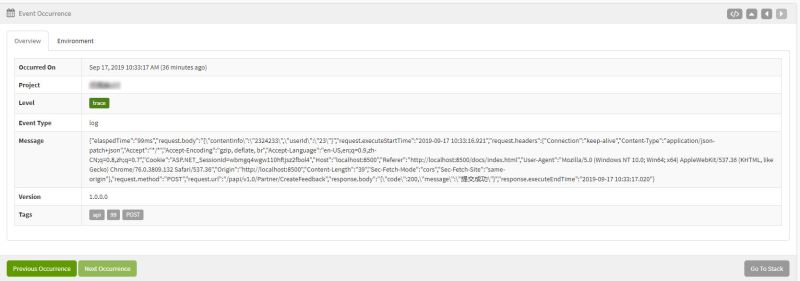
public void Configure(IApplicationBuilder app, IHostingEnvironment env) { if (env.IsDevelopment()) { app.UseDeveloperExceptionPage(); } app.UseErrorHandling();// 全局异常尽量放上面 ... app.UseRequestResponseLogging(); ... app.UseExceptionless(Configuration); app.UseMvc(); }现在请求一次看一下记录的效果:我的日志存在exceptionless上,如下图
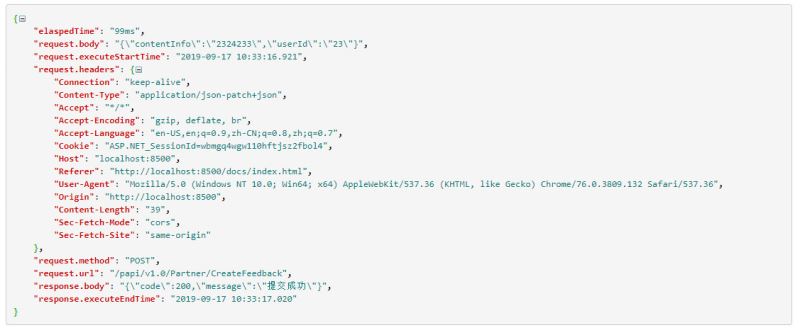
解析json,记录的数据如下:
总结
以上所述是小编给大家介绍的.net core webapi通过中间件获取请求和响应内容的方法,希望对大家有所帮助,如果大家有任何疑问请给我留言,小编会及时回复大家的。在此也非常感谢大家对网站的支持!
如果你觉得本文对你有帮助,欢迎转载,烦请注明出处,谢谢!
您可能感兴趣的文章:
相关内容
- .Net Core下HTTP请求IHttpClientFactory示例详解_实用技巧_
- .NET Core 微信小程序退款步骤——(统一退款)_实用技巧_
- .net core部署到windows服务上的完整步骤_实用技巧_
- asp.net大文件上传解决方案实例代码_实用技巧_
- ASP.NET MVC实现依赖注入的完整过程_实用技巧_
- 利用.net core实现反向代理中间件的方法_实用技巧_
- .NET Core 实现微信小程序支付功能(统一下单)_实用技巧_
- .Net Core WebApi的简单创建以及使用方法_实用技巧_
- ASP.NET Core 3.0迁移的完美避坑指南_实用技巧_
- Win10 IIS 安装.net 4.5的方法_实用技巧_